
Visual Programming
Definition and Basics
- Visual programming is a method of developing software applications without the need for manual coding, using a user-friendly and easy-to-understand interface.
- It allows users to create programs by manipulating graphical elements rather than writing text-based code. This approach uses visual representations, such as flowcharts or block diagrams.
- Example: Instead of writing complicated code for a game where a cat jumps to collect stars, you drag and drop pictures and icons to build it, like a picture puzzle. It shows how everything looks as you create, without typing lots of words.
- Visual programming software is a type of software that allows users to create programs and applications without writing traditional text-based code. Instead, users use graphical elements such as blocks, icons, and diagrams that can be dragged, dropped, and connected to build functional programs, animations, games, and other interactive applications.
They include;
- Scratch
- ScratchJr
- GameMaker Studio
- Construct 3
- Stencyl
- Kodu Game Lab
- LEGO Mindstorms EV3
- VEXcode VR
- Microsoft MakeCode
- Ardublockly
- mBlock
- Thunkable
- App Inventor
- Bubble
- Glide
- Code.org
- Tynker
- Blockly
- Snap!
- Alice
- Processing (p5.js)
- Max/MSP
- Pure Data
- TouchDesigner
- LabVIEW
- Unreal Engine Blueprints
- Node-RED
- Zapier
- IFTTT
- PictoBlox
- Codey Rocky
- Blockly: A library for making block-based editors. Generates code in JavaScript, Lua, Dart, Python, PHP. Used for teaching tools, web apps, games, animations.
- Scratch: Online community and language for making stories, games, animations without code. Used to share ideas, learn computing basics, collaborate.
- Code.org: Non-profit for teaching computer science via classes, tutorials. Uses Blockly to teach functions, events, loops, variables.
Importance of Visual Programming
- Easy to Learn – The drag-and-drop interface removes syntax barriers, allowing beginners to focus on logic and structure. This lowers frustration and builds early confidence in computational thinking.
- Encourages Creativity – By enabling students to create games, animations, and stories, visual programming turns abstract concepts into creative expression. This motivates continued learning and exploration.
- Builds Logical Thinking – Sequencing blocks, using conditions, and debugging visually develop systematic problem-solving and algorithmic reasoning. These are foundational skills for all technical fields.
- Accessible & Inclusive – Visual programming opens coding to diverse learners, including younger students and those without prior experience, promoting equity in digital education.
- Fast Prototyping – Ideas can be tested and iterated quickly, allowing students to experiment and learn through trial and error. This fosters innovation and iterative design thinking.
- Visual Debugging – Seeing the flow of logic in a visual format makes identifying and correcting errors intuitive and educational. This demystifies the debugging process.
- Collaboration-Friendly – Projects are easy to share, discuss, and remix, encouraging teamwork and peer learning. This mirrors real-world collaborative development.
- Prepares for Advanced Coding – Concepts learned visually—like variables, loops, and events—directly transfer to text-based programming languages, easing the transition to more advanced study.
- Real-World Relevance – Visual programming is used in robotics, IoT, game design, and educational tools, showing students how coding applies in modern industries and innovations.
Application Areas of Visual Programming Software
Visual programming software (e.g., Scratch, Blockly, App Inventor) is used to solve problems in various fields due to its easy-to-use graphical interface.
Key application areas:
|
Application Area |
Description |
Examples in Daily Life |
|---|---|---|
|
Education |
Teaches coding concepts, logic, and problem-solving to beginners/kids without code syntax. |
Scratch projects for math (e.g., maze for directions), science simulations, or e-learning apps. |
|
Game Development |
Builds interactive games for fun or learning. |
Maze games, quiz games, or simple adventures to teach concepts like position/direction. |
|
Mobile App Development |
Creates apps for smartphones/tablets using drag-and-drop. |
Simple tools like calculators, reminders, or educational apps (e.g., MIT App Inventor). |
|
Web Development |
Designs interactive websites or web-based tools. |
Basic web apps for school information sharing. |
|
Animation & Storytelling |
Makes animated stories to educate or raise awareness. |
Stories on community issues (e.g., bullying, hygiene, recycling). |
|
Robotics & Simulations |
Programs robots or virtual models to perform tasks. |
Simple robot behaviors or environmental simulations. |
|
IoT (Internet of Things) |
Through visual interfaces, learners can simulate or control smart devices like lights or sensors, exploring connectivity and automation. This introduces how technology interacts with the physical world. |
Creating Applications Using Visual Programming
- Involves creating a user interface (UI) using a drag-and-drop environment. UI elements like text boxes can be added to the canvas.
- Developers use methods to create two- or three-dimensional software with graphical components, text, symbols, and icons.
- Users create applications without text-based code; instead, use blocks, icons, and diagrams.
- Makes it easier and faster to develop innovative, interactive solutions for daily life problems.
Developing Interactive Games (e.g., Using Scratch)
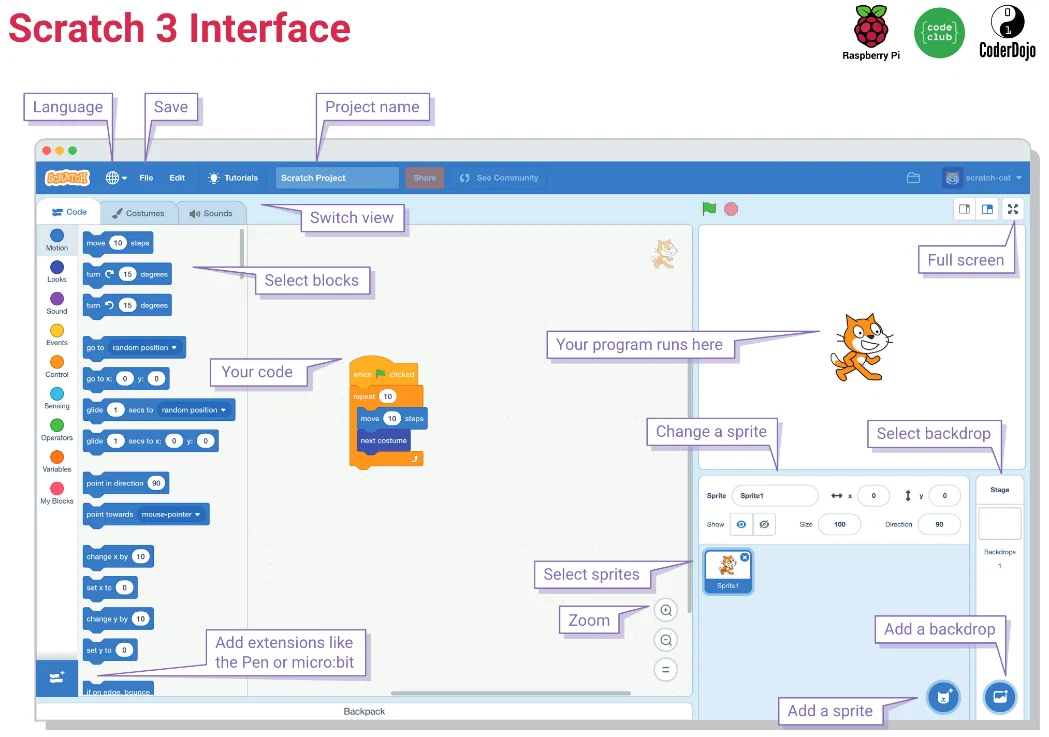
Scratch: There is an online community and computer language called Scratch that lets people make stories, games, and animations without writing any code. Scratch can be used to share ideas, learn the basics of computing, and work with other people.
Developing Interactive Games (e.g., Using Blockly)
- Steps for a simple maze game:
- Add Repeat-until block: Loop executes at least once; condition tested at end.
- Add move forward block: Moves finder forward in its facing direction.
- Add if path block: Check if path to left (turn left) or else turn right. Determines if path ahead.
- Add IF-THEN (if-do) block: Determines next path. Use IF-ELSE if only one option.
Embracing Visual Programming in Day-to-Day Life
Offers benefits by making it attractive for tasks; uses graphical elements instead of text coding.
Reasons for importance:
- Ease of access and learning: Uses pictures/icons; easier for beginners without professional knowledge.
- Testing platform: Quick prototypes of ideas (interfaces, workflows, algorithms); helps iterate faster in software, games, data analysis.
- Collaboration and communication: Easier for diverse skills; non-programmers understand visual logic; improves developer-stakeholder talk.
- Value for education: Teaches code basics without syntax; engages kids and learners.
- User interface (UI) design: Key for web/app development; creates good-looking, functional interfaces.
- Innovation and creativity: More visual/interactive way to share ideas; leads to new problem-solving.