
Definition
Visual programming is a method of creating software applications by manipulating graphical elements (blocks, icons, diagrams) instead of writing text-based code. It uses a drag-and-drop interface, making it beginner-friendly.
Application Areas of Visual Programming Software
- Education: Teaching coding logic to beginners (e.g., Scratch, Blockly, Code.org).
- Game Development: Creating interactive games, stories, and animations.
- Mobile App Development: Building simple Android/iOS apps (e.g., MIT App Inventor).
- Robotics and Automation: Programming robots and smart devices using flowcharts.
- Web Development: Designing website layouts and interactions visually.
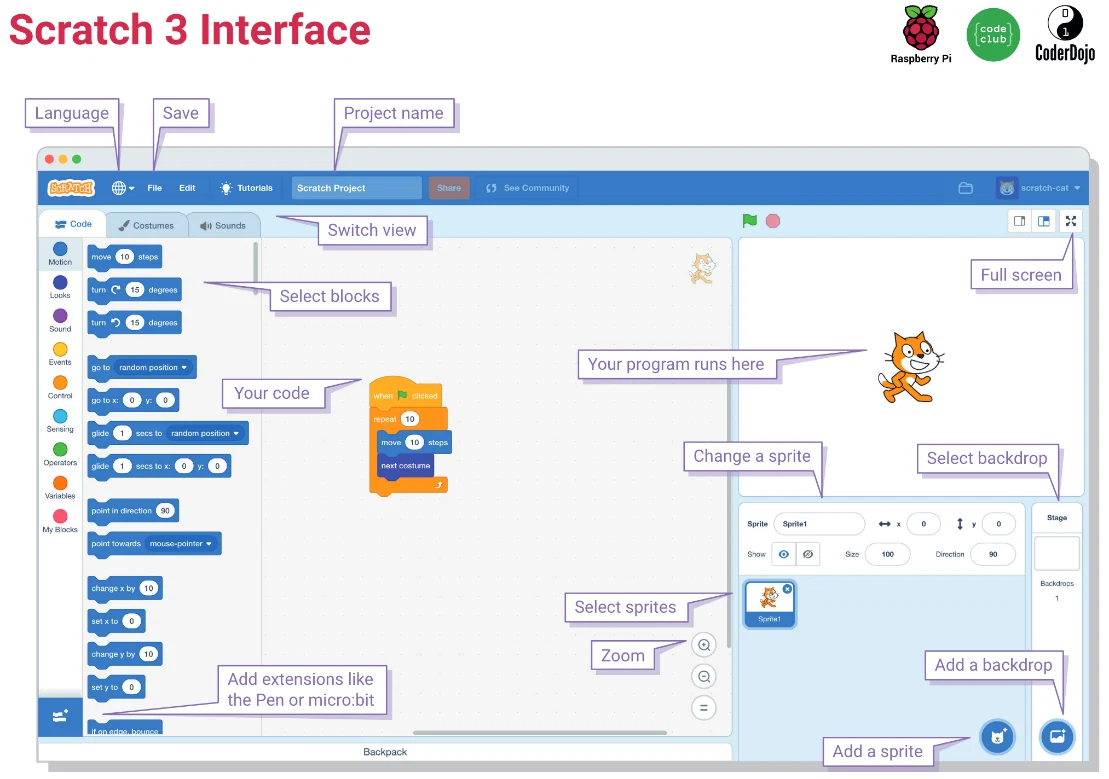
Figure 8: Screenshot of the Scratch programming interface
Creating Applications Using Visual Programming (Example: Scratch)
Steps to create a simple game/animation:
- Open Software: Go to scratch.mit.edu or use the offline editor.
- Choose Backdrop & Sprite: Select a background and a character/object.
- Drag Blocks: Use blocks from categories like Motion, Looks, Sound, Events, Control, Sensing, and Variables.
- Build Scripts:
- Start with an Event block (e.g., when green flag clicked).
- Add Motion (e.g., move 10 steps).
- Add Control (e.g., forever loop, if touching edge, bounce).
- Add Variables (e.g., change score by 1).
- Test and Debug: Run the program, fix errors, and refine.
Common Scratch Blocks
- Events: when green flag clicked, when space key pressed.
- Control: forever, repeat 10, if...then...else.
- Motion: move 10 steps, turn 15 degrees.
- Looks: say Hello!, switch costume to....
- Variables: set score to 0, change score by 1.
Importance of Visual Programming in Day-to-Day Life
- Accessibility: Makes programming easy to learn without syntax errors.
- Problem-Solving: Develops logical thinking, sequencing, and creativity.
- Innovation: Allows users to create tools to solve daily problems (e.g., a calculator app, an educational quiz).
- Digital Literacy: Promotes STEM skills and future career readiness in Kenya's digital economy.